IDENT Aviation presents

FlightDeck

The tools you need, from first lesson to checkride.

FlightDeck is an iPhone app for student pilots working toward the Private Pilot License: live weather for your home airport, profiles for the aircraft you fly and their performance numbers, E6B, PA/DA and weight & balance calculators that show their work, and PPL study guides.

Free to start: your home airport dashboard and the PPL Study Roadmap are included.

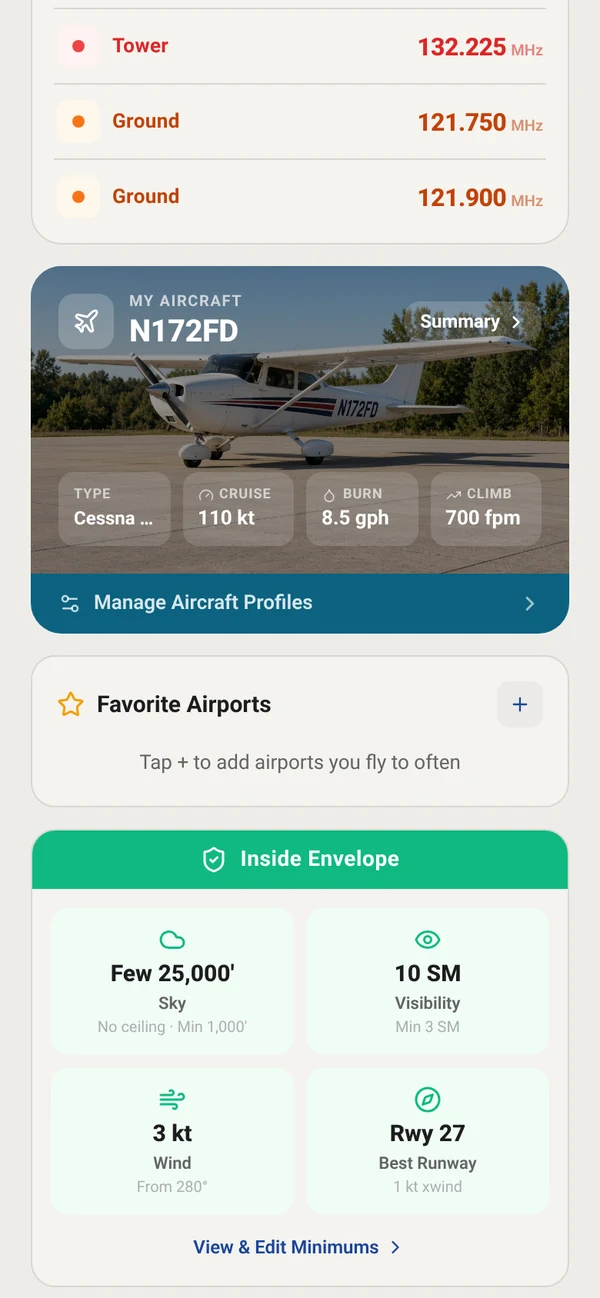
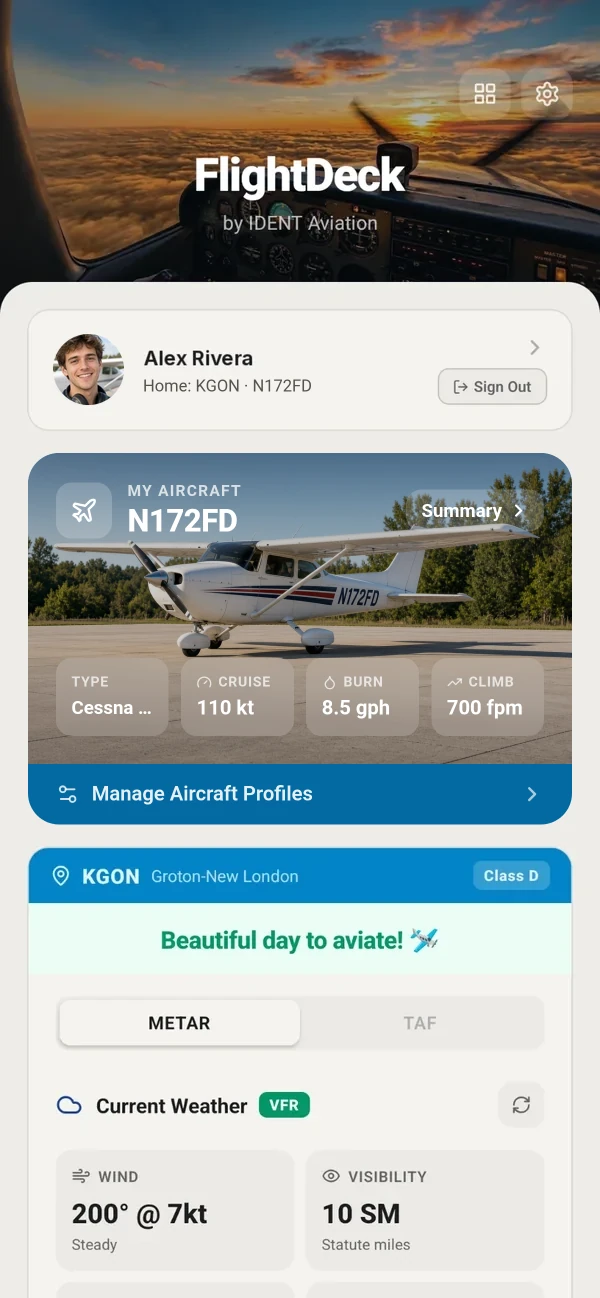
FlightDeck home screen for pilot Alex Rivera, home airport KGON. At the top, the My Aircraft card shows a front three-quarter photo of Cessna 172 N172FD parked on the ramp, with its cruise speed of 110 knots, fuel burn of 8.5 gallons per hour and climb rate of 700 feet per minute. Below it, KGON Groton-New London, Class D, says “Beautiful day to aviate!” above live VFR weather: wind 200 at 7 knots and 10 miles visibility. Home screen cards can be reordered; this layout puts My Aircraft first.

The problem

Your training toolkit is scattered.

Student pilots and new PPLs juggle a fragmented toolkit. Your airport, your aircraft, your calculators and your study notes usually live in different places, and most tools give you an answer without the reason behind it.

  • E6B whiz wheel
  • Paper FAR/AIM
  • Flashcard decks
  • Separate weather apps
  • Scattered PDFs

FlightDeck puts your home airport, your aircraft, your calculators and your ground school in one place, organized around how student pilots actually train, and it shows you the why behind the numbers, not just the answers.

Inside the app

Your airport, your aircraft, your calculators, your study guides.

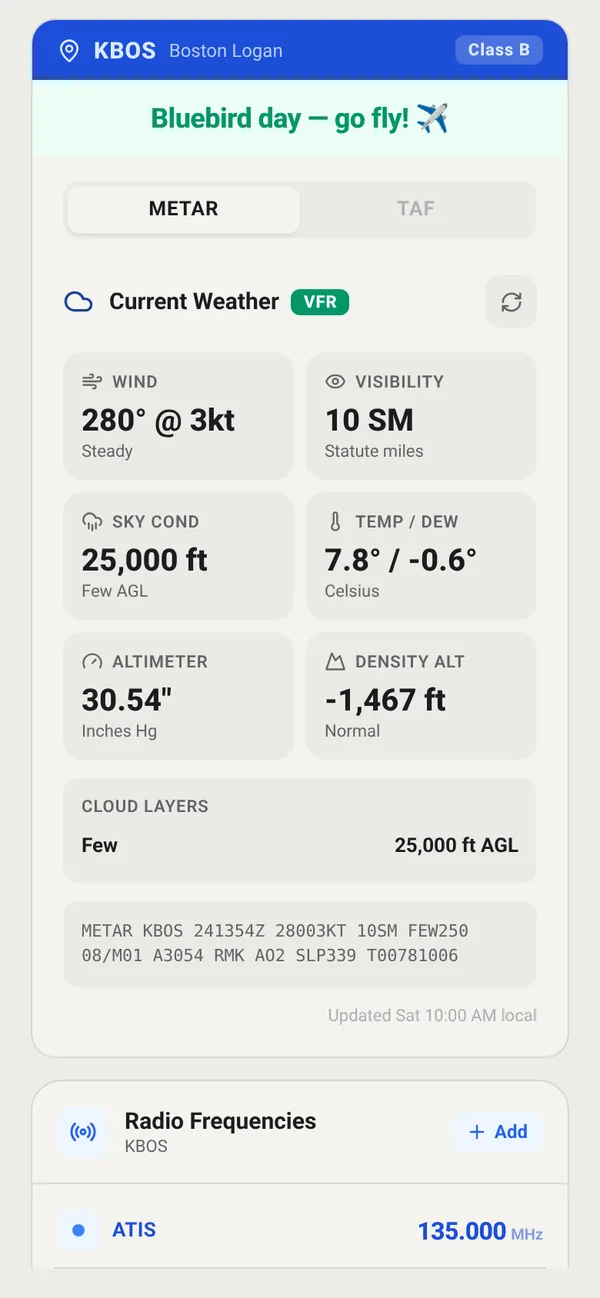
FlightDeck home airport card for KBOS Boston Logan, Class B: Bluebird day, go fly. METAR tab with current VFR weather tiles for wind, visibility, sky condition, temperature and dew point, altimeter and density altitude, the raw METAR, and saved KBOS radio frequencies starting with ATIS 135.000.

Free

Your home airport, live

Set the airport you fly from and FlightDeck opens on it: current METAR and TAF, decoded into wind, visibility, sky condition, temperature and dew point, altimeter and density altitude, plus the raw METAR and your saved radio frequencies.

  • METAR & TAF: decoded weather tiles and cloud layers
  • Radio Frequencies: ATIS, Tower and Ground for your airport
  • Favorite Airports: add the airports you fly to often
  • Rusty on a code? Look it up in Study Ref’s Weather Decoding section (Study Tools)

“Can I fly?”

FlightDeck doesn’t just show the weather. It checks today’s conditions at your home airport and tells you plainly whether they fit: sky, visibility and wind.

Free: check weather against standard VFR visibility and cloud minimums plus conservative default wind limits. Flight Tools: set your own personal minimums.
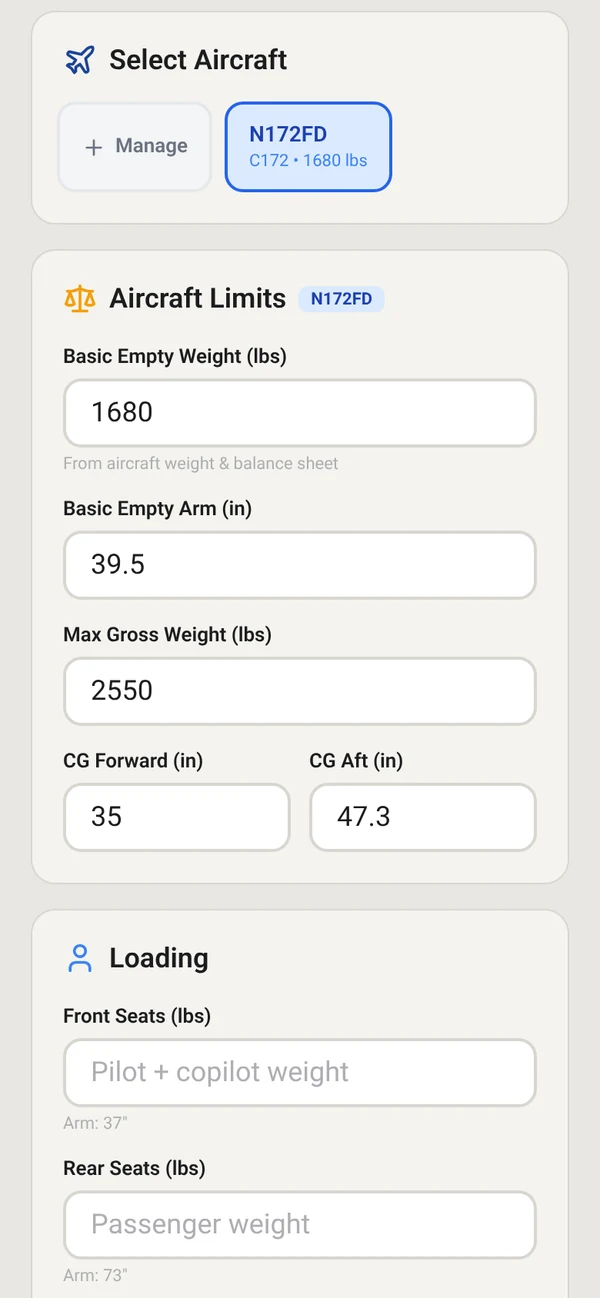
Weight and balance screen with N172FD selected under Select Aircraft, C172, 1680 pounds, and its Aircraft Limits filled in: basic empty weight 1680 pounds, basic empty arm 39.5 inches, max gross weight 2550 pounds, CG forward 35 and aft 47.3 inches.
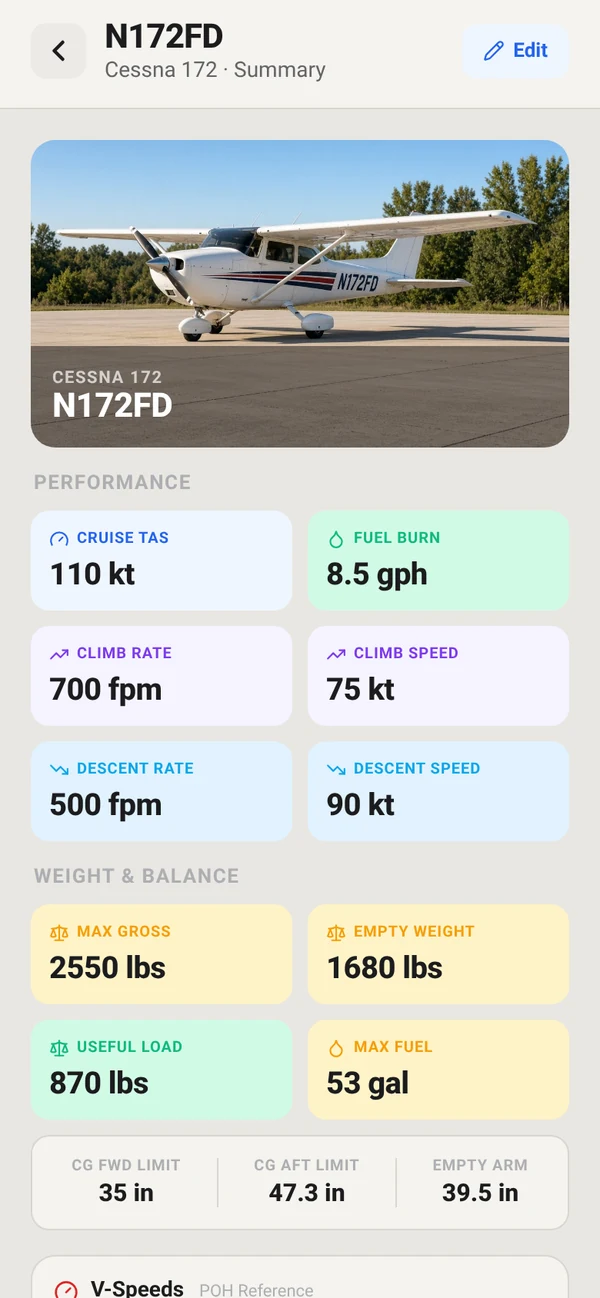
FlightDeck saved aircraft profile for N172FD, a Cessna 172, with a photo of the airplane above its performance numbers: cruise 110 knots true airspeed, fuel burn 8.5 gallons per hour, climb 700 feet per minute at 75 knots, descent 500 feet per minute at 90 knots, plus weight and balance figures: max gross 2550 pounds, empty weight 1680 pounds, useful load 870 pounds, max fuel 53 gallons, CG limits 35 to 47.3 inches.

Flight Tools

Your aircraft and its performance

Save your tail number, cruise speed and fuel burn once, and every calculator starts from your aircraft.

  • Aircraft Profiles: type, cruise speed, fuel burn and climb rate for each tail number
  • Weight & balance limits: basic empty weight and arm, max gross weight and CG range, saved per aircraft
  • My Aircraft card: add a photo of the airplane you fly, and its cruise, fuel burn and climb show on your home screen. Move the card wherever you like.
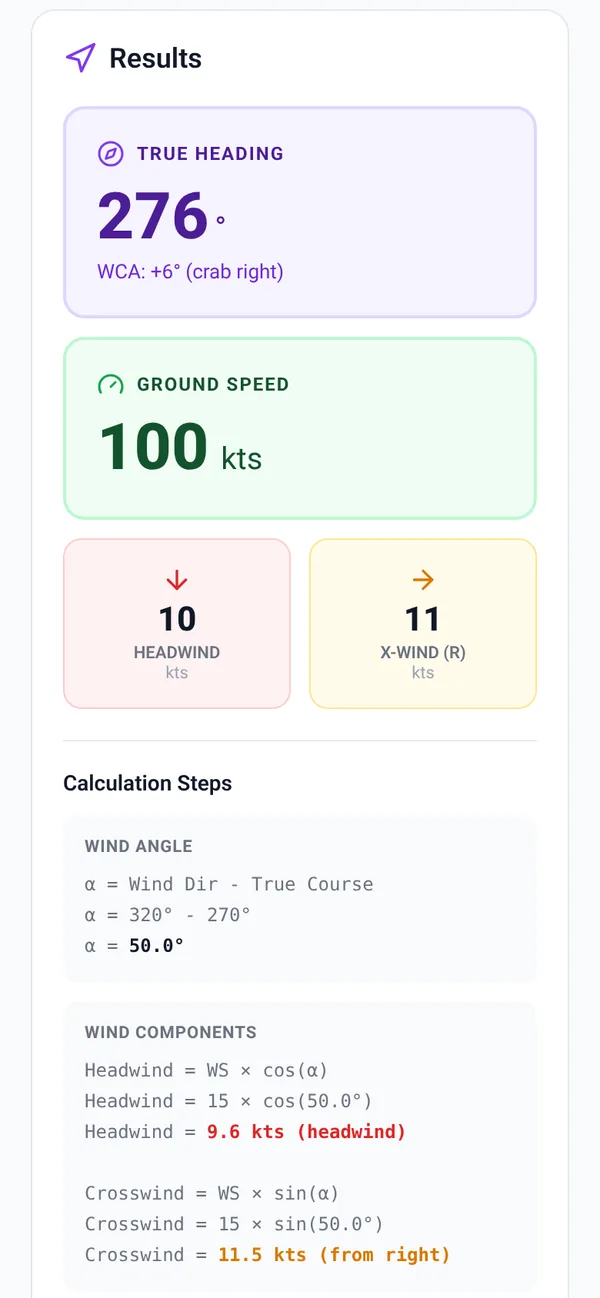
E6B wind calculator results: true heading 276 degrees, ground speed 100 knots, 10 knot headwind and 11 knot crosswind, with calculation steps.
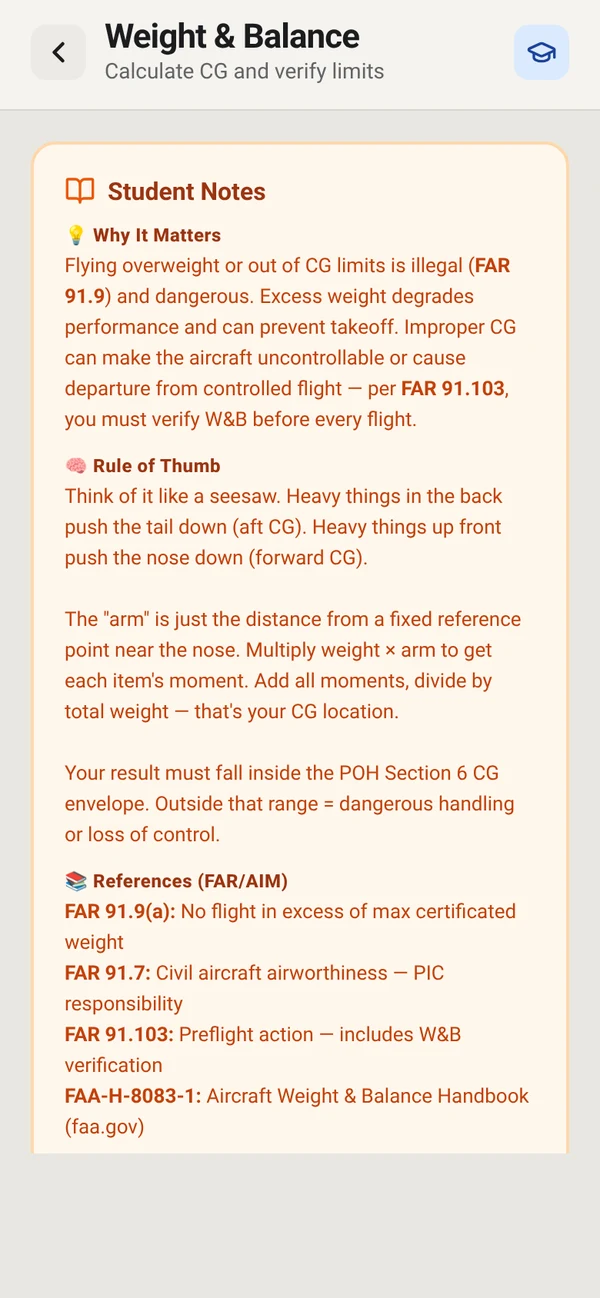
FlightDeck Weight and Balance calculator with Student Notes open. Why It Matters: flying overweight or out of CG limits is illegal under FAR 91.9 and dangerous, and FAR 91.103 requires you to verify weight and balance before every flight. Rule of Thumb: think of a seesaw; multiply weight by arm to get each moment, add the moments and divide by total weight to find your CG. References (FAR/AIM): FAR 91.9(a), FAR 91.7, FAR 91.103 and the FAA Aircraft Weight and Balance Handbook, FAA-H-8083-1.

Flight Tools

Aviation calculators that show their work

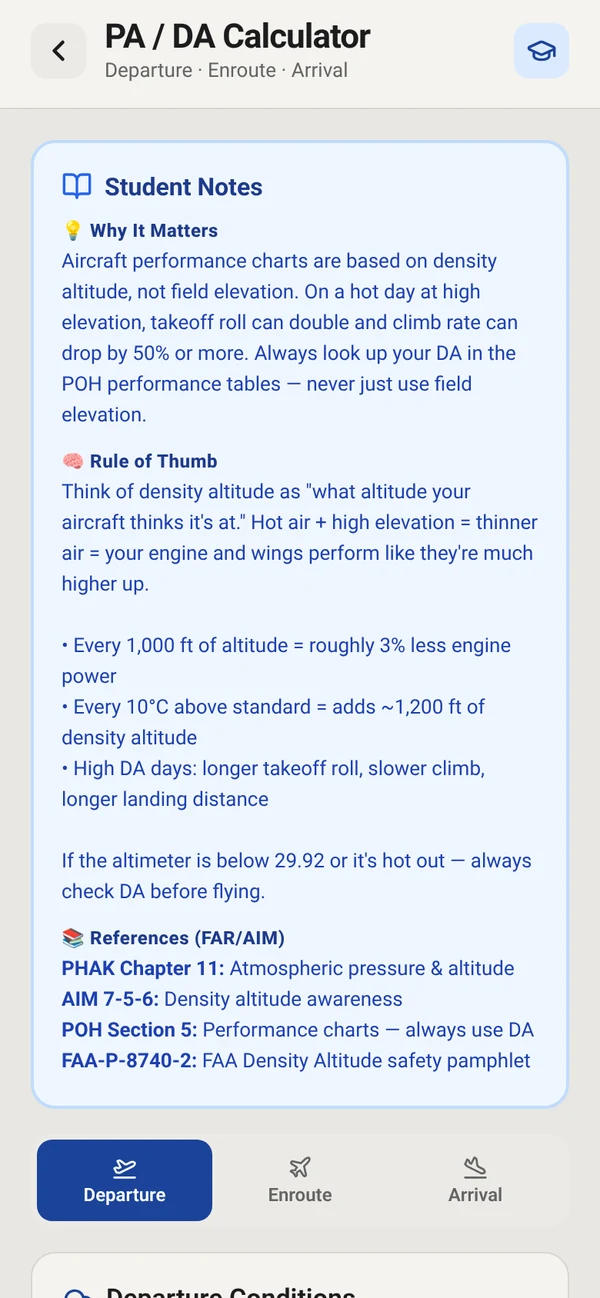
The E6B and preflight math you learn in ground school, worked step by step so you understand the answer. Turn on Student Notes and the calculator also explains why the number matters, gives you a rule of thumb, and lists the FAR/AIM and FAA handbook references to read.

  • PA/DA Calculator: pressure and density altitude
  • E6B Wind: heading, ground speed, wind correction, headwind and crosswind
  • Weight & Balance: total weight and CG checked against your limits
  • Fuel, Climb and Descent calculators, a Unit Converter and more: 8 calculators in all
  • Student Notes: Why It Matters, Rule of Thumb and References (FAR/AIM), on calculators like PA/DA, E6B Wind and Weight & Balance
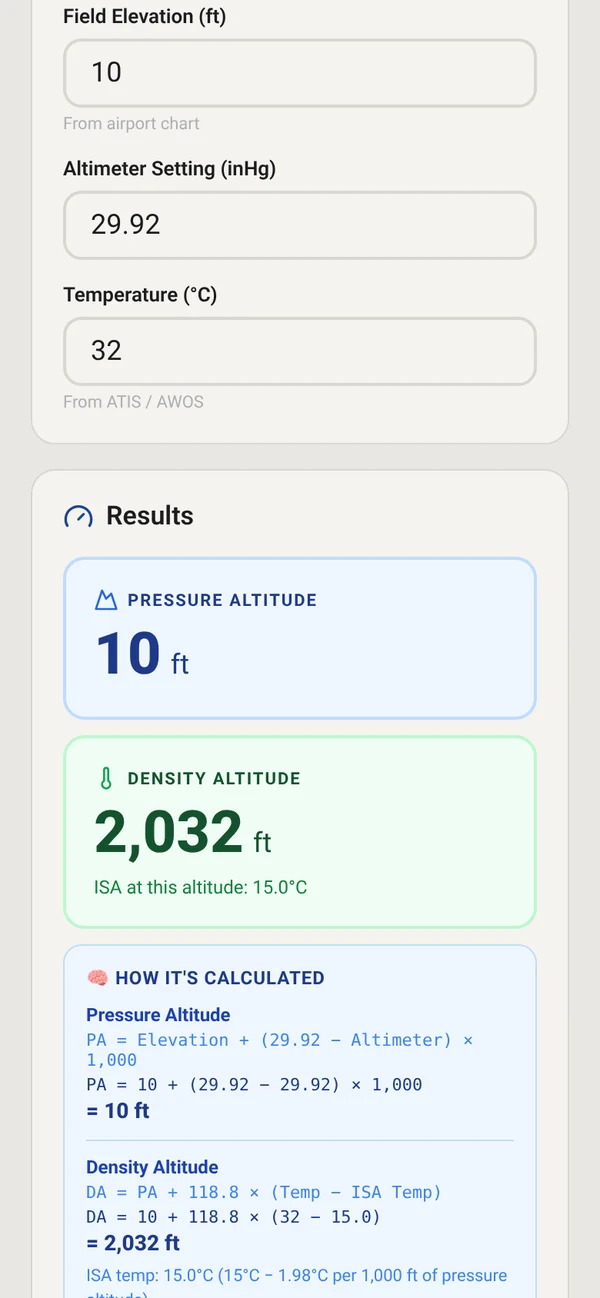
PA/DA calculator with field elevation 10 feet, altimeter 29.92 and temperature 32 degrees Celsius. Results: pressure altitude 10 feet and density altitude 2,032 feet, with a How It’s Calculated panel showing each formula worked with those numbers, including DA = PA + 118.8 × (Temp − ISA Temp).
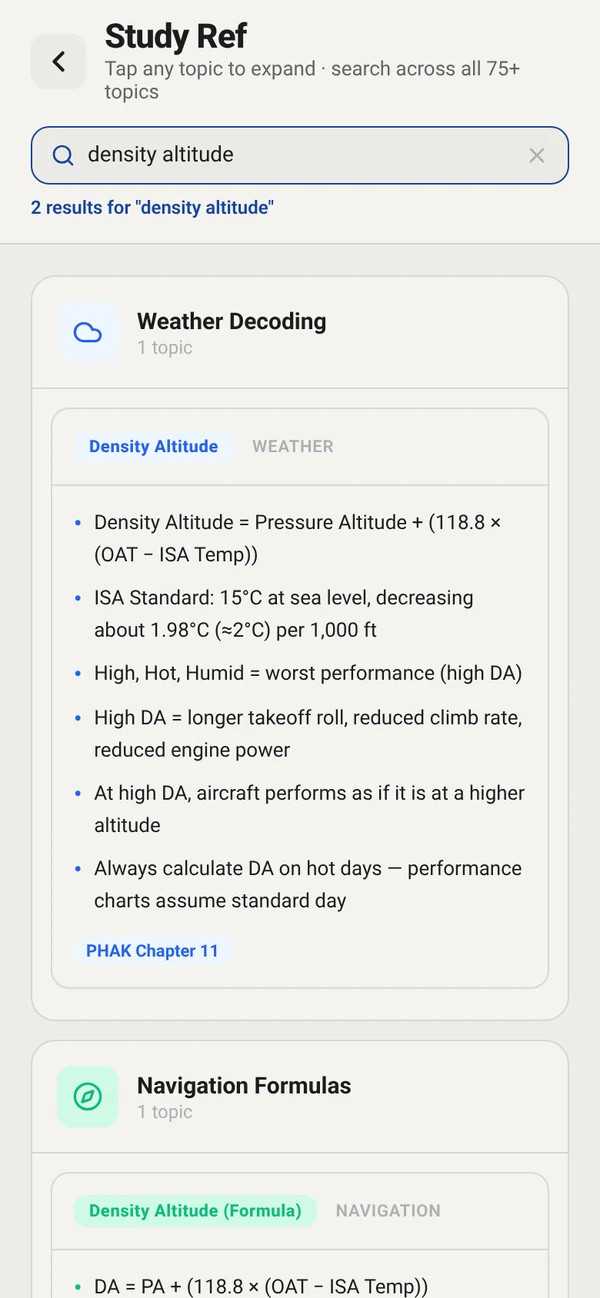
Study Ref searched for density altitude: the Weather Decoding entry gives the density altitude formula with the 118.8 multiplier, the ISA standard of 15 degrees Celsius at sea level decreasing about 1.98 degrees (about 2 degrees) per 1,000 feet, what high density altitude does to takeoff roll and climb, and its source, PHAK Chapter 11.

Flight Tools + Study Tools

The why behind the number

Get the number, then learn where it comes from

Run density altitude in the PA/DA calculator and FlightDeck shows exactly how it got the answer. With Study Tools, jump straight to the matching Study Ref topic to see the same formula, what a high density altitude does to your takeoff and climb, and the PHAK chapter to read next.

  • Show the math: How It’s Calculated works each formula with your numbers
  • Student Notes: why it matters, a rule of thumb and FAR/AIM references, inside the calculator
  • Study Ref: 75+ topics in 8 sections, with sources like the PHAK

A study aid, not a replacement for your POH or your CFI.

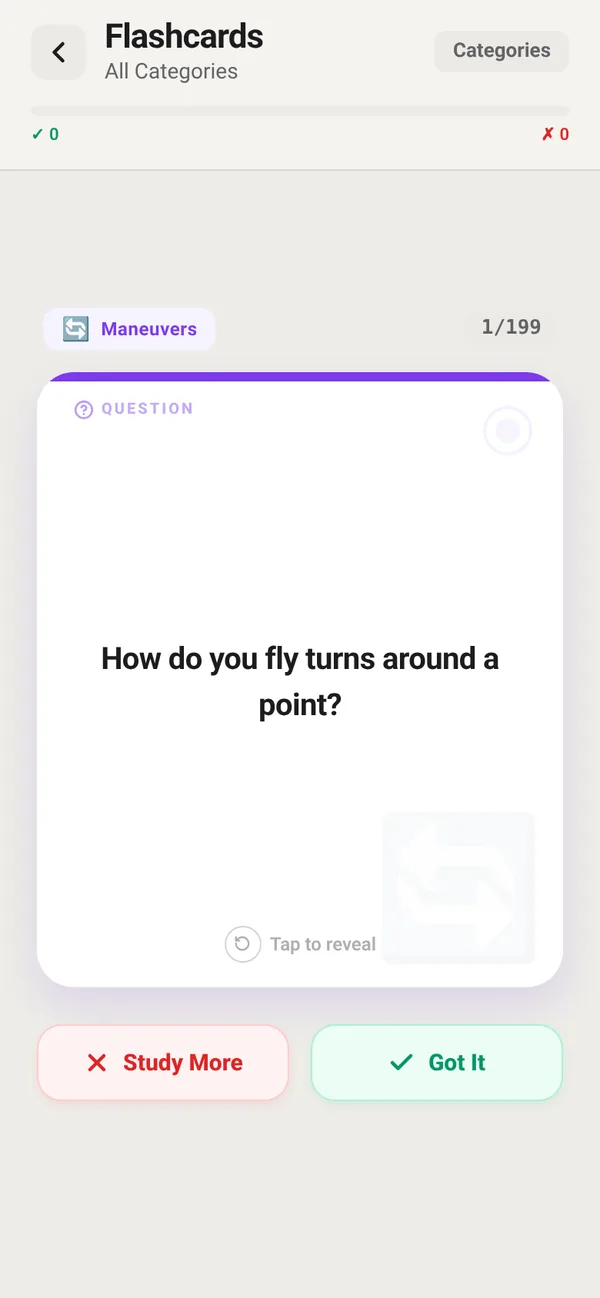
FlightDeck flashcard 1 of 199 in the Maneuvers category asking: How do you fly turns around a point?
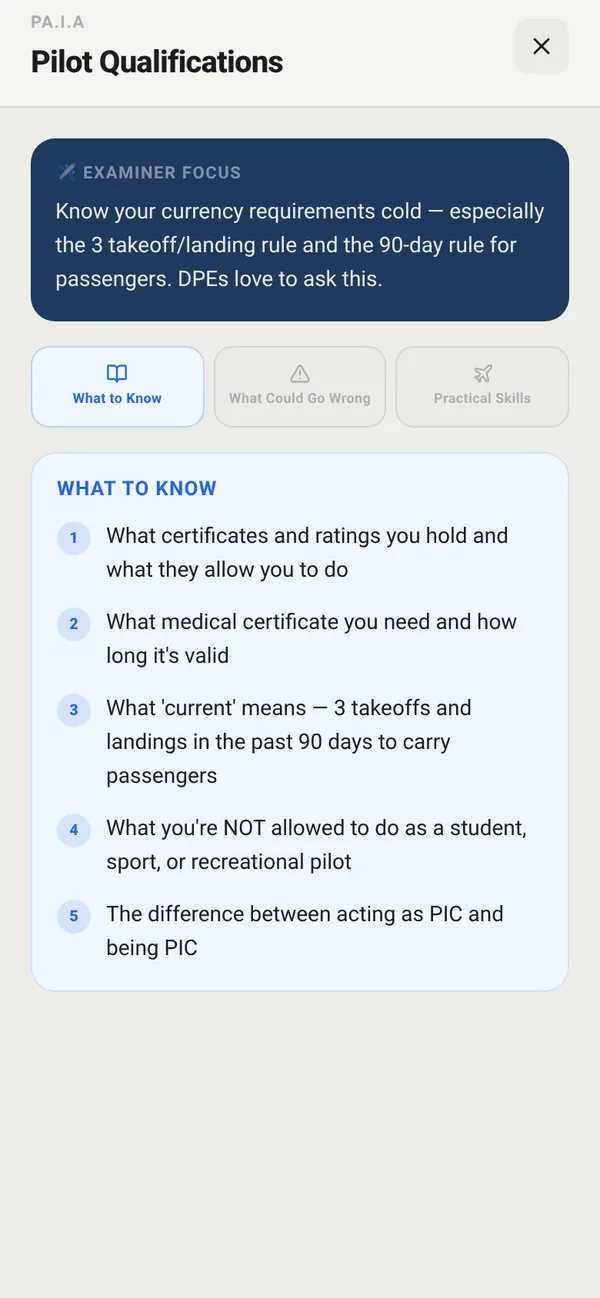
FlightDeck Checkride Prep task PA.I.A Pilot Qualifications with tabs What to Know, What Could Go Wrong and Practical Skills, and the examiner focus note.

Study Tools

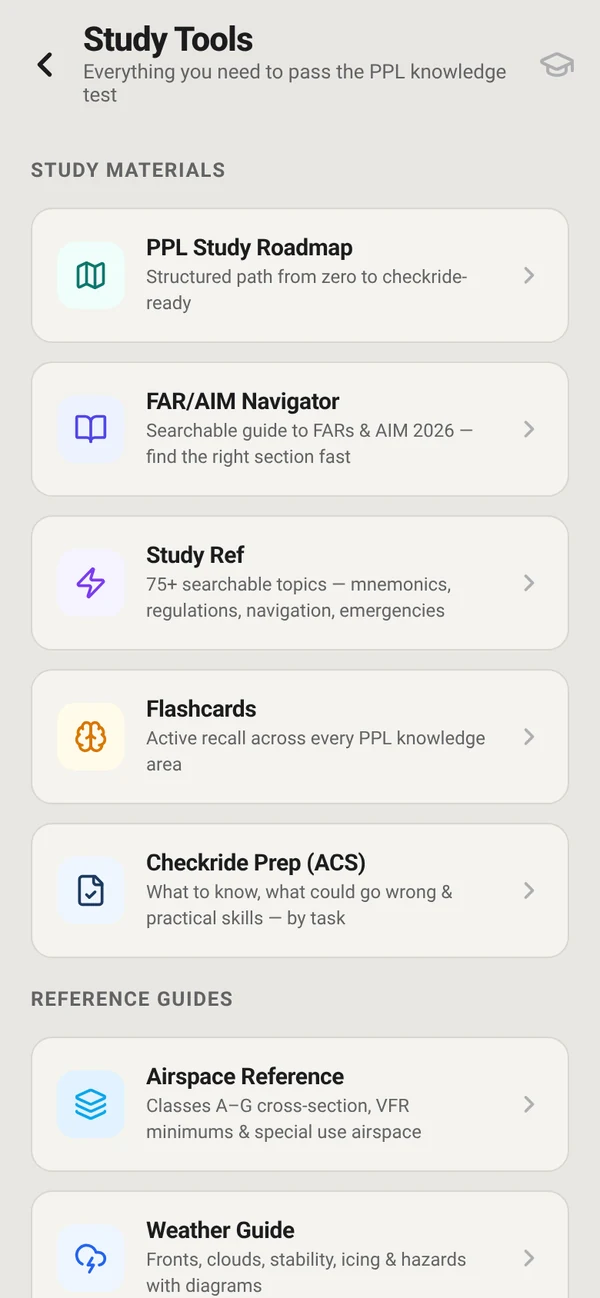
PPL study guides built around the ACS

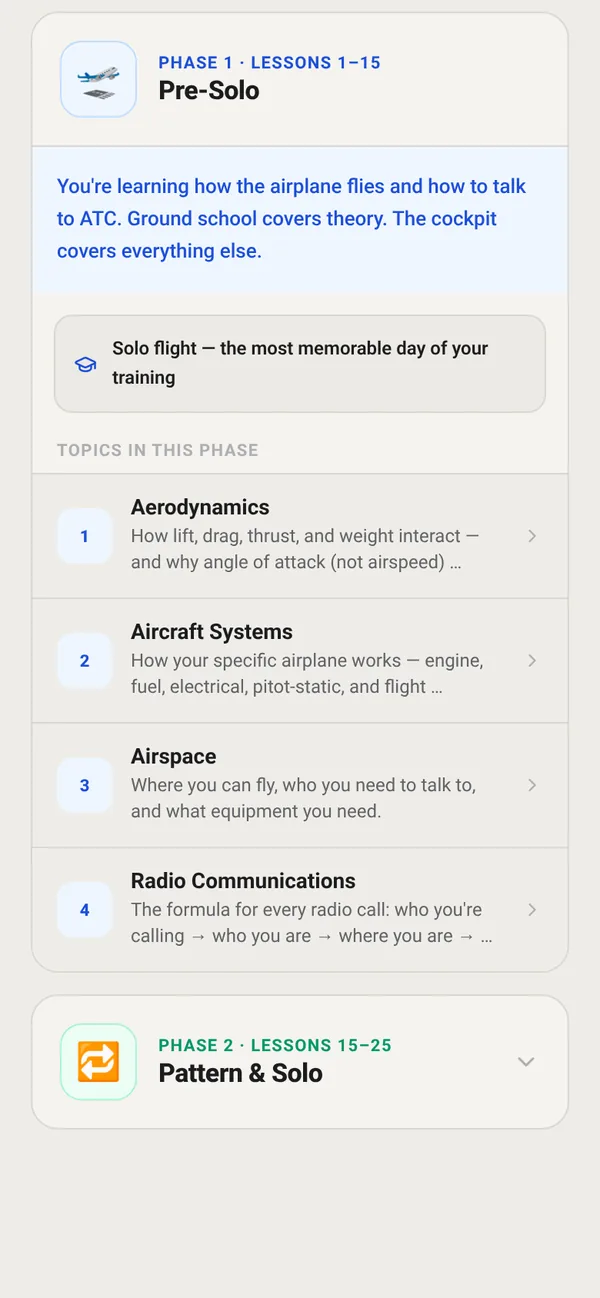
  • PPL Study Roadmap Free: a phased path from day 1 to checkride
  • Checkride Prep (ACS): 41 tasks, each broken into What to Know, What Could Go Wrong, and Practical Skills
  • Flashcards: 199 cards in 17 categories
  • FAR/AIM Navigator: a searchable guide to the FAR and AIM
  • Study Ref: 75+ searchable topics, from mnemonics and regulations to emergencies, with where to read more
  • Airspace, Weather Guide & V-Speeds references

Why FlightDeck

Built for the way you actually train.

“Can I fly?”, built in

Free: check weather against standard VFR visibility and cloud minimums plus conservative default wind limits. Flight Tools: set your own personal minimums.
Learn the why, not just the answer

Calculators show their math and references, Study Ref points you to the source, and study is organized by the ACS.

Buy only what you need

Two separate one-time purchases, so you pay for the half you’ll use: the calculators, the study library, or both.

Pricing

Start free. Pay once for what you need.

No subscriptions. Each one is a one-time purchase, and it’s yours to keep.

Free

$0

Get started

  • Home airport dashboard with live METAR/TAF
  • Weather check against standard VFR visibility and cloud minimums
  • PPL Study Roadmap
  • See every locked tool before you buy

Flight Tools

$9.99

one-time purchase

  • 8 aviation calculators
  • E6B, Weight & Balance, Fuel, PA/DA and more
  • Aircraft Profiles, your own personal minimums, ratings & milestones

Study Tools

$9.99

one-time purchase

  • Full study library
  • ACS Checkride Prep & 199 flashcards
  • FAR/AIM Navigator & Study Ref

Purchases are made in the app through the App Store. A free account is required.

Launch list

Be first to know when FlightDeck launches

We’ll email you once when FlightDeck is on the App Store, plus occasional launch news. You can unsubscribe anytime.

We only use your email for FlightDeck launch updates. See our Privacy Policy.

Contact

Questions, feedback or support?

We’d love to hear from you, whether it’s a feature idea, a bug, or help with your account.

support@identaviation.com